
AllSides
AllSides Technologies, IncNews & Magazines
3.4172.00 Reviews
- Version
- 2.2.2
- Installs
- 50.00K
- Age Rating
- Everyone 10+
Screenshots
Our Review of AllSides
 Analysis by Appyee
I approached AllSides as a reader who wants more context before reacting to a headline. Developed by AllSides Technologies, Inc, this free News & Magazines app is built around media-bias ratings and the idea that a single news source rarely gives the whole picture. My overall impression is that it works best as a comparison tool: it helps me notice how different outlets frame the same subject, rather than pretending to replace every news app I already use.
That distinction matters. I would not open it expecting a complete newspaper, a private reading space, or an instant answer to which side is correct. I would open it when a story feels politically loaded, when several headlines seem to describe different realities, or when I want to slow down before sharing something. Its average rating is 3.4 from around 368 ratings, and that feels consistent with an app that offers a useful concept but may not satisfy every reader’s preferred news routine.
How AllSides feels when the network is doing the work
The central experience depends on current online content. When my connection is stable, the app’s value comes from moving between perspectives without making me search manually for every outlet. That saves time during a quick morning check or when a major story is developing. Instead of treating the first headline I see as the complete story, I can use the app to compare presentation, wording, emphasis, and omission.
This is where AllSides is more interesting than a conventional single-publication news app. A typical news reader can be excellent for following one editorial voice, but it may reinforce the habits I already have. AllSides pushes me toward a more deliberate workflow: read one version, inspect another, then ask whether the disagreement is about facts, interpretation, priority, or language.
The usefulness changes when the network becomes unreliable. A slow connection can interrupt the simple act of checking another perspective, and that interruption is more important here than it would be in an app whose main content is already stored on the phone. The service’s purpose is tied to timely material, so I treat it as a connected reading tool rather than something I depend on during a signal-free commute.
I also would not use it as my only source during a fast-moving emergency. When information changes minute by minute, a comparison app can help reveal framing, but I still want direct updates from relevant official channels and established reporting. AllSides is strongest for examining coverage, not for turning uncertainty into certainty.
Why comparison is more valuable than a single headline
One of the better habits I developed with the app was separating the article’s subject from the article’s angle. Two reports can discuss the same event while choosing different details for the headline, opening paragraph, and supporting examples. Seeing those choices close together makes bias easier to notice without requiring me to agree with one rating completely.
The media-bias labels are useful starting points, but I would not treat them as a final verdict on every article. An outlet can publish a careful report even if its general position is not my preference, and a source I usually trust can still produce a weak piece. The practical benefit is not that the app eliminates judgment; it gives me a prompt to use more of my own.
A concrete everyday example is a conversation in a group chat. Someone posts a dramatic headline, and my first impulse is either to agree or argue. With AllSides, I can pause, look for coverage from another point on the spectrum, and compare what each report considers important. That does not guarantee perfect understanding, but it reduces the chance that I am responding to one carefully selected sentence.
Using it on a phone rather than at a desk
On mobile, the app fits short reading sessions better than long research sessions. I can check it while waiting for an appointment, during a lunch break, or after seeing a headline in another app. The phone format encourages quick comparisons, which is convenient but also creates a temptation to skim. I get more from it when I read the headline differences first and then choose one or two stories to examine properly.
For a deeper investigation, a larger screen and a browser may be more comfortable. A phone is ideal for discovering that coverage differs; it is less ideal for keeping several articles open while taking notes or checking original documents. That is not a flaw unique to AllSides, but it affects how I judge the app. I see it as a mobile checkpoint in my news routine, not as a full research desk.
The age rating is Everyone 10+, which makes it broadly suitable for younger readers with appropriate guidance. Still, the subject matter of daily news can include distressing events, conflict, crime, and heated political arguments. Parents or teachers who introduce it to younger users should focus on reading habits as much as access: compare sources, distinguish reporting from opinion, and avoid assuming that a label settles the question.
The app runs on Android 7.0 or later, so compatibility is reasonably accessible for people using older supported phones. Its current version is 2.2.2. I would still keep expectations practical on an older device: a news app that depends on loading current material can feel less comfortable when the phone, browser components, or connection are already struggling.
What happens when loading fails
The most frustrating failure point is simple: I may be ready to compare coverage, but the next piece does not load promptly. In that situation, I first check whether other online apps are working, then retry the page instead of repeatedly tapping the same control. If the connection is weak, switching to a stronger network is more useful than assuming the article or rating has disappeared.
I also avoid making a judgment from a single failed attempt. News services can be affected by temporary delivery problems, changes at the original publication, or a story that is still being updated. When one item is unavailable, I can still use the broader comparison idea with another story rather than abandoning the entire session.
Recovery is easier when I keep the app’s role narrow. If I need a quick overview, I can return later. If I need confirmed information immediately, I move to the relevant primary source or a dependable live-news service. That division of labor prevents a temporary connectivity problem from turning into a bad decision based on an incomplete screen.
Reading carefully without wasting mobile data
Because the experience is connected, I use it more thoughtfully on mobile data than I would use a downloaded magazine. I avoid opening every related story simply because it appears interesting. Instead, I select one topic, compare the most relevant perspectives, and stop once I understand how the framing differs. This makes the session more focused and helps keep unnecessary loading under control.
A useful routine is to note the question I am trying to answer before opening the app. Am I checking whether a claim is widely reported? Am I looking for how different outlets describe responsibility? Am I trying to identify what information is missing from a viral post? Having a question prevents endless headline hopping and makes the app feel like a tool rather than another stream to scroll.
I also prefer using it when I have enough time to read beyond the first line. Comparing headlines alone can expose tone, but it can also exaggerate disagreement. The article body may show that sources share more facts than their headlines suggest. That is an important trade-off: AllSides can reveal bias quickly, but responsible use still requires reading the underlying material.
Where it fits beside familiar news alternatives
Compared with a standard news aggregator, AllSides has a clearer editorial purpose. Many aggregators organize stories by popularity, topic, or publication, while this app makes the relationship between viewpoint and coverage more central. That is valuable for readers who already feel overwhelmed by repetition and want a structured reason to compare sources.
Compared with following one newspaper or broadcaster, it offers more distance from a single editorial identity. The cost is that the experience may feel less settled. A dedicated publication can provide continuity, specialist reporting, newsletters, and a consistent voice. AllSides is better when I want contrast; a focused publication is better when I want depth from a source I have evaluated over time.
Compared with social media, the app is a healthier starting point for checking a controversial claim because I am not relying only on whatever a recommendation system places in front of me. Social platforms are faster for discovering reactions, but they mix reporting, commentary, jokes, activism, and rumor. AllSides does not remove the need for skepticism, yet it gives me a more useful path than arguing from a screenshot.
There is also a trade-off against reading original sources directly. Going straight to a publication can provide more context and a clearer sense of its reporting standards. AllSides adds convenience by making comparison easier, but convenience can encourage me to judge an outlet through a label before understanding the specific article. I use the ratings as a doorway, not as a substitute for reading.
Who will benefit most from the app
I think AllSides is a good match for politically engaged readers who want to challenge their own information habits. It is also useful for students, discussion groups, and anyone who regularly has to evaluate competing claims. The strongest users will be comfortable with uncertainty and willing to ask why two sources emphasize different facts.
It can also help a person who feels trapped in a personalized news bubble. Rather than subscribing immediately to several publications, that reader can use comparison as a first step. The app encourages a practical question: what does another outlet consider important here? Even when the answer is uncomfortable, that question is more productive than assuming disagreement automatically means dishonesty.
I would recommend skipping it as a primary news app if I wanted one polished, continuous feed with deep coverage in a particular subject. It is also not the best fit for someone who wants news that works reliably without a network connection, since its usefulness depends on accessing current online material. Readers who dislike comparing viewpoints or who want only sources that match their existing perspective may find the app more challenging than helpful.
Small habits that make the experience better
My first tip is to compare the language before comparing my opinion. Words such as “crisis,” “dispute,” “reform,” or “controversy” can guide an emotional response before the facts appear. Looking at those choices side by side helps me notice framing without immediately labeling one writer as malicious.
My second tip is to use the app after encountering a claim elsewhere, not only during a general browsing session. That gives the comparison a purpose. I can check whether the claim appears across different editorial perspectives, whether the important qualification is missing, and whether the disagreement is factual or interpretive.
My third tip is to revisit a developing story instead of assuming the first comparison is permanent. Early coverage often reflects incomplete information. A later article may clarify what was speculation and what held up. The app is more valuable when I treat news as a changing record rather than a one-time contest between headlines.
Finally, I keep the ratings in their proper place. They are a useful map, especially when I am unfamiliar with an outlet, but maps are not the territory. I still check the article’s evidence, date, sources, and distinction between news and opinion. That combination is where the app delivers its best result: it makes better questions easier to ask.
My final view on the connected reading experience
AllSides is a focused free news app from AllSides Technologies, Inc that earns its place on my phone when I want perspective rather than another endless feed. Its roughly 50K-plus installs show that it has found an audience, while the mixed average rating suggests a product with a worthwhile idea that will not suit every reading style. I appreciate the way it turns media comparison into a normal part of checking a story.
The main limitation is also central to its design: I need a working connection and enough attention to read beyond labels. When the network is slow, the experience loses momentum; when I rush, comparison can become superficial. I would not use it as my sole source for urgent updates, and I would choose a specialist publication for sustained reporting in one field.
For me, the best reason to install it is simple: it interrupts automatic agreement. It does not promise a perfect neutral answer, and I would be suspicious of any tool that did. Instead, it gives me a practical way to compare coverage, recognize framing, and recover from the narrow view created by one headline. If that is the kind of news habit you want to build, AllSides is worth trying.
Verdict
Strengths of AllSides
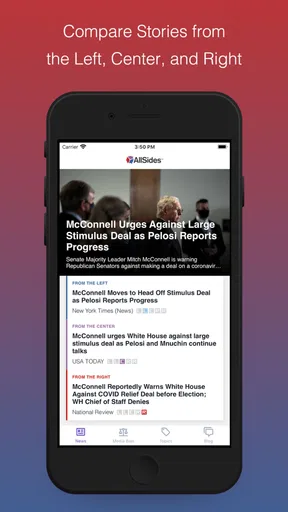
- Shows how left, center, and right outlets cover the same story.
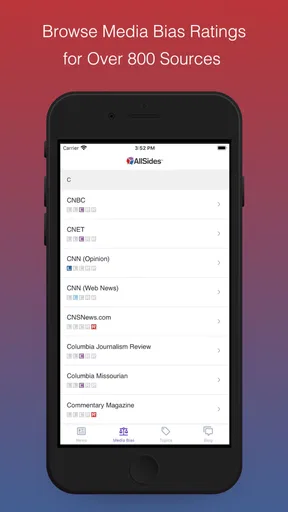
- Media-bias ratings help users compare sources more critically.
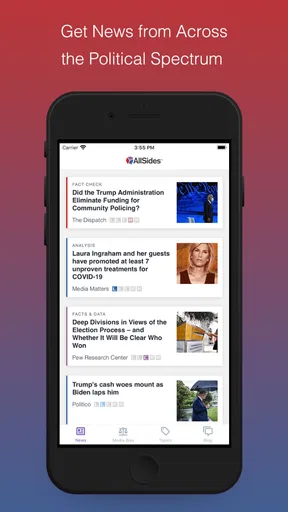
- Includes diverse perspectives on many major news topics.
- Offers a useful way to discover publications outside your usual feed.
- Simple layout makes switching between viewpoints straightforward.
Limitations of AllSides
- Some bias ratings may feel subjective or outdated as outlets change.
- Coverage can vary significantly depending on the story or news cycle.
- The app may encourage viewing politics mainly through left-right labels.
- Certain articles open externally and may require subscriptions to read.
- Notifications and available features may differ between app versions.
Similar Picks in This Category
View All
Google News - Daily Headlines
Google LLC4.0

X
X Corp.4.8

Flipboard:Your Social Magazine
Flipboard3.4

Opera News: breaking & local
Opera4.5

Hindi News by Dainik Bhaskar
Dainik Bhaskar Group4.0

Way2News Daily News App
Way2News ( Formerly Way2SMS )4.6
Frequently Asked Questions
What is AllSides, and what does the app do?
AllSides is a news and media-bias platform designed to help users compare how different outlets report the same stories. The app presents news from sources labeled across the political spectrum, such as left, center, and right, and may include balanced summaries, bias ratings, and side-by-side perspectives. It is useful for readers who want broader context instead of relying on a single publication.
How does AllSides determine whether a news source is left, center, or right?
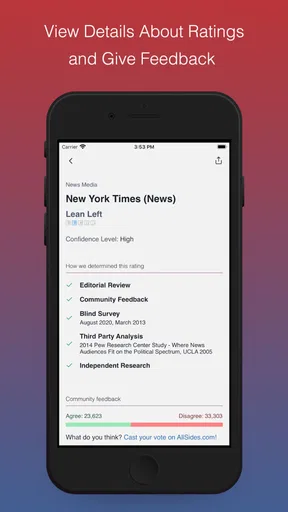
AllSides uses its own media-bias rating system to classify news sources and articles. Ratings can be based on methods such as blind surveys, editorial analysis, community feedback, and comparisons with other coverage. These labels are intended as guidance rather than absolute facts, because political language and editorial approaches can change over time. Users should still read the full articles and make their own judgments.
Can AllSides help me avoid political bias in the news?
AllSides cannot remove bias from news, but it can make different perspectives easier to recognize. By showing coverage from multiple viewpoints, the app encourages users to compare headlines, wording, story selection, and omitted details. This can reduce the chance of forming an opinion from one source alone. However, the app does not guarantee that every perspective is equally accurate or that every story is presented completely.
Is AllSides free to download and use?
AllSides generally offers free access to its core news-comparison features, allowing users to explore media-bias ratings and read coverage from different sources. Depending on the platform, region, or current service model, some features may require registration, include advertising, or be connected to premium offerings. Before downloading, users should check the official Google Play Store or App Store listing for the latest pricing and subscription details.
Is AllSides suitable for students and younger users?
AllSides can be helpful for students learning about media literacy, current events, and political perspectives because it encourages source comparison and critical reading. Nevertheless, the news may include mature topics, violence, political conflict, or disturbing events. Parents and educators should review the app’s content and privacy settings, discuss how bias ratings work, and remind younger users to verify important claims through reliable primary sources.
